
BlogGuide
How to set up an AI appointment setter for Instagram: objections, qualification, handoff
How to set up an AI appointment setter for Instagram: company knowledge, qualification, an objection playbook, the booking link and handing threads to a human.
By Jakub Kowalski, Founder
You set up an AI appointment setter for Instagram in six steps: describe your offer and knowledge base, write down who qualifies and who does not, prepare answers to your most common objections, set the goal of the conversation with your booking, offer or checkout link, decide when the setter hands the thread to a human, and start in Suggestions mode, where the setter writes drafts for your approval. Then you switch it to Autopilot and the setter replies on its own. Below, each step is shown on DM Hero's AI Setter.
What an AI setter is and how it runs a conversation is covered in What is an AI setter on Instagram, and what to give the AI versus your people in AI setter vs human setter.
Offer and knowledge base
What you sell, to whom and for how much
Qualification and disqualification
Who fits and who does not
Objection playbook
Six objections with your answers
Goal and link
Booking, offer or checkout
Handoff criteria
When you take over
Suggestions first, then Autopilot
Drafts first, sending second
Step 1: company knowledge
The setter answers from your offer, your knowledge base and the conversation itself. The more specific your description, the more specific its answers to prospects. In DM Hero you describe your offer and a knowledge base, and the knowledge base can hold your prices too.
A good knowledge base answers the questions prospects ask first:
- What exactly you sell and in which packages.
- Who it is for: industry, company size, the situation where the offer makes the most sense.
- What it costs: exact prices or ranges and what they depend on.
- What working together looks like: the first week, turnaround times, who gets in touch.
- What happens after the booking: how long the call takes, who joins, what to prepare.
Write it the way you answer DMs: short, in your own words, with examples. Short, specific sentences in the knowledge base fit the conversation best, and if you set the message style to "A few short ones (like a human)", the setter splits its reply into short message bubbles, the way people write in a chat.
The configuration also holds the persona. The setter is instructed to reply in the prospect's language, and you describe the persona's language and tone in your own words. If your market expects a formal tone, or first names only, add that to the persona. You can also turn on emoji reactions and set how often they appear: the setter can then add a reaction, such as a heart or a thumbs up, with its reply, the way a person does in a chat.
Step 2: qualification and disqualification
The setter configuration has separate fields for who qualifies and who does not. Use them to spell out who should get your link and who should not.
Write down two or three criteria that really decide whether you work together. Typical ones:
- Need: the prospect has the problem you solve, such as empty class slots, too few inquiries, or no time to answer messages.
- Scale: number of locations, staff or clients a month.
- Budget or readiness to invest this quarter.
- Timing: they want to start within a month, not "someday".
Disqualification is a short list of situations where a link makes no sense: a different industry or country, a private person instead of a business, someone looking for a job rather than a service. Pick criteria you can ask about briefly: in DMs, one question at a time works best.
Step 3: the objection playbook
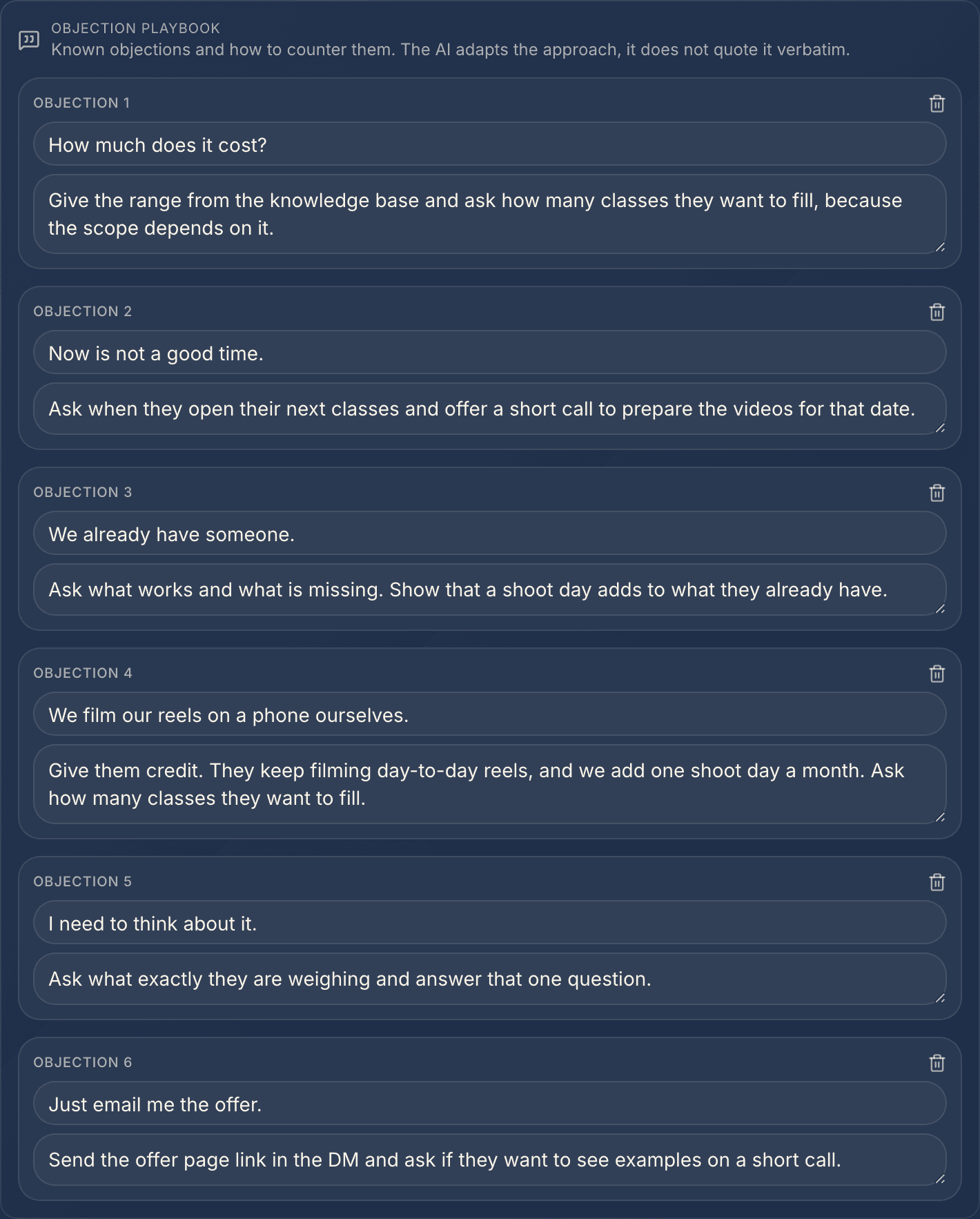
Add the six objections you hear most often to DM Hero's playbook. By default the setter handles them the way a good salesperson would, with your arguments, and it handles objections that are not on the list the same way.
For each objection, prepare three things: how it sounds, how you answer it and what you ask next. The answer and the question go together in the approach field. Good ones to start with:
- "How much is it?" Give the range from your knowledge base and ask about the scale the price depends on.
- "Now is not a good time." Ask when it will be, and offer a short call to prepare for that date.
- "We already have someone." Ask what works and what is missing, and show where you add to what they have.
- "We do it ourselves." Give them credit and show what you add on top.
- "I need to think about it." Ask what exactly, and answer that one question.
- "Send me something by email." Offer a link to a short call or to your offer page, so the prospect gets it right away in the DM.
This is the playbook filled in for a company that films videos for pilates studios:
The first message goes out with the campaign, from your template, and the setter takes over from the prospect's reply. How to write the cold DM itself is in How to write a cold DM on Instagram.
Step 4: the goal and the link
You describe the goal of the conversation in your own words, and the goal link can point to a calendar, an offer page or a checkout. When the goal is a call, the setter sends the booking link and the prospect picks the time. When the goal is a sale, it sends your offer or checkout link.
In the goal field you write, in your own words, when the setter should send the link. A good rule: the link goes to someone who has qualified and heard one reason to click, such as "I will show you examples from your industry" or "we will price it for your size".
When your connected Calendly is the goal link, the setter adds the conversation's ID to it, so a booking can be traced to the thread it came from. When Calendly passes the booking to DM Hero, the lead gets the converted status and the booked tag, and the setter stops selling and sends no more follow-ups. It answers the prospect's next message with a short closing, then sticks to logistics, and hands any reschedule or cancellation to you.
Step 5: when the setter hands over
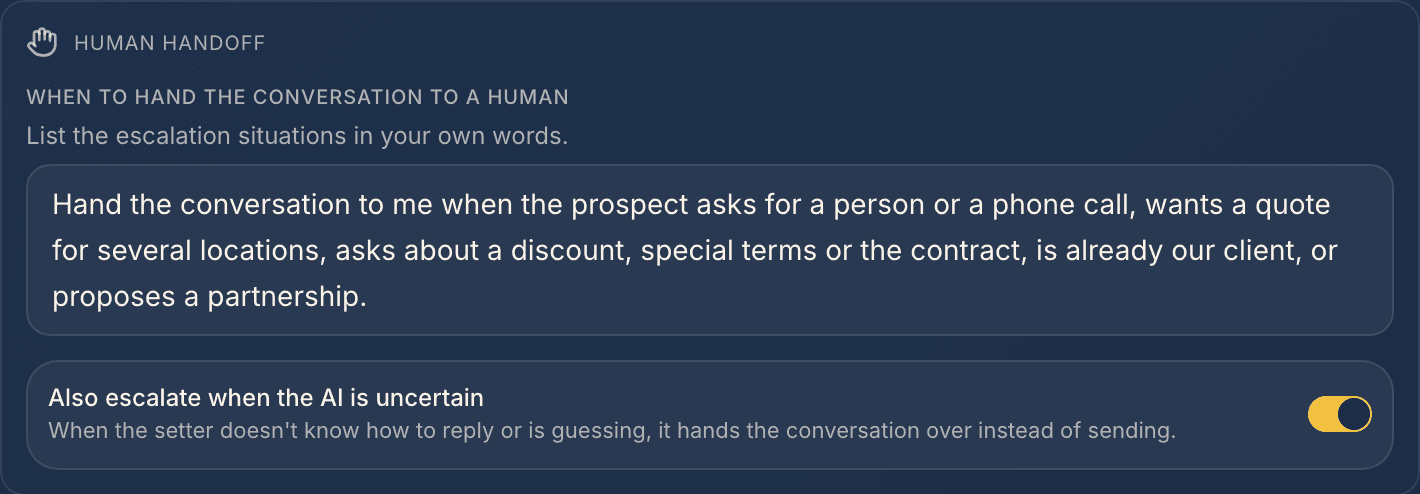
Write your handoff criteria before you switch the setter to Autopilot. When one of them is met, or the prospect shares a phone number or email address, the setter does not send a reply and flags the thread for takeover, so a person finishes the conversation.
Write them the way you would brief a new sales rep:
- The prospect asks for a person, or for a phone call straight away.
- The deal is outside your standard: several locations, custom pricing, a partnership.
- Negotiation: discounts, special terms, questions about the contract.
- An existing client writes about their service.
- Anything you would rather answer yourself.
Below the criteria you can also have the setter hand over a conversation when it is not sure how to reply: instead of guessing, it leaves the reply to you.
A handed-over thread waits for you in the DM Hero inbox with the conversation history. Pick it up the same day, while the prospect is still in the conversation. When you are done, you can hand the thread back to the setter.
Step 6: Suggestions first, then Autopilot
The AI Setter has two independent switches on every connected account: Outbound for replies to your cold outreach and Inbound for people who message you first. Each has three modes, and you turn them on when you are ready.
- Off: the setter does not reply, but the lead's reply still stops the sequence and sets the status to replied.
- Suggestions: the setter writes a draft and leaves it in the inbox for your approval.
- Autopilot: the setter writes and sends on its own.
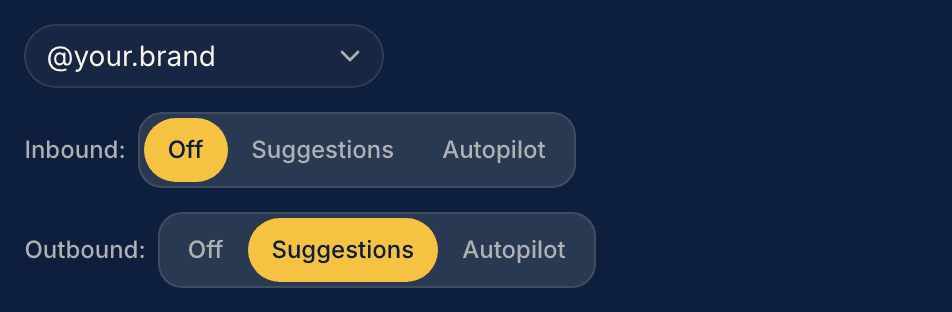
Start with Suggestions mode on replies to your cold outreach: the setter writes drafts and you approve them. Move every edit into the knowledge base or the playbook, and once the drafts need no changes, switch the setter to Autopilot. You turn it on for people who message you first the same way.
On Autopilot, the setter replies at a human pace, usually within a few minutes, and before it replies it marks the message as seen and shows that it is typing. If the prospect goes quiet, the setter follows up on its own about a day later, and if the silence continues, it tags the lead no_reply.
How to improve the setter after launch
After launch, DM Hero shows what is worth improving in three places:
- Setter analytics shows how far conversations get and where they stall. If many of them end on the same objection, improve that answer in the playbook.
- The daily AI summary groups the problems prospects write about. It is a ready list of topics for your knowledge base, and often for your cold DMs too.
- Variant tests. You can test several setter variants side by side. DM Hero compares them by the share of conversations where the lead reaches the converted status (from a Calendly booking or marked by you in the inbox or CRM) and names a winner once the difference is statistically significant. You publish the winner in one click.
Change one thing at a time, such as one objection answer or the moment the link goes out, so you know what worked.
Checklist before you switch to Autopilot
- The knowledge base covers your offer, price, how working together looks and what happens after the booking.
- Qualification has two or three short criteria, and disqualification a short list of situations with no link.
- The playbook holds the objections you hear every week, each with an answer and a next question.
- The goal describes your rule for sending the link, and the link points where you want it.
- Handoff criteria cover requests for a person, negotiation and existing clients.
- You approve drafts from Suggestions mode without edits.
The AI Setter is included in the Starter, Growth and Pro plans, Pro multi-reps too. DM Hero runs the whole path in one place: campaigns send your cold DMs from your own account, replies land in one inbox, and the AI Setter answers from your configuration, qualifies, handles objections, sends your link and hands you the conversations that need a person. Compare the plans on the pricing page, and we will walk through the setter setup with you on a demo.
Frequently asked questions
- How do you set up an AI appointment setter for Instagram?
- In six steps: describe your offer and knowledge base, write down who qualifies and who does not, prepare answers to your most common objections, set the goal of the conversation with your booking, offer or checkout link, decide when the setter hands the thread to a human, and start in Suggestions mode, where the setter writes drafts for your approval. Then you switch it to Autopilot and the setter replies on its own.
- How many objections should an AI setter's playbook cover?
- The six you hear most often. You add each to DM Hero's objection playbook with your answer and the question that moves the conversation forward. The setter handles objections that are not on the list like a good salesperson, too. Pick the ones you hear every week, such as price, bad timing and "we already have someone".
- When should an AI setter send the booking link?
- After qualification, once the prospect fits and has a reason to talk. DM Hero's AI Setter sends your link and the prospect picks the time. When Calendly passes the booking to DM Hero, the lead gets the converted status and the booked tag, and the setter stops selling and sends no more follow-ups. It hands any reschedule or cancellation to you.
- Can an AI setter answer questions about price?
- Yes. DM Hero's AI Setter answers from the offer and knowledge base you give it, so if you add your prices or ranges there, it shares them with the prospect and keeps the conversation moving towards your link.
- When does DM Hero's AI Setter hand a conversation to a human?
- When one of your handoff criteria is met, or the prospect shares a phone number or email address. DM Hero's AI Setter then flags the thread for takeover, and you finish the conversation with its history in the inbox. When you are done, you can hand it back to the setter.